Pillar guide
Agentic Architecture: Core Components of Production Agents
A practical architecture model for agentic systems: goals, planners, tools, memory, orchestration, evals, and control planes.
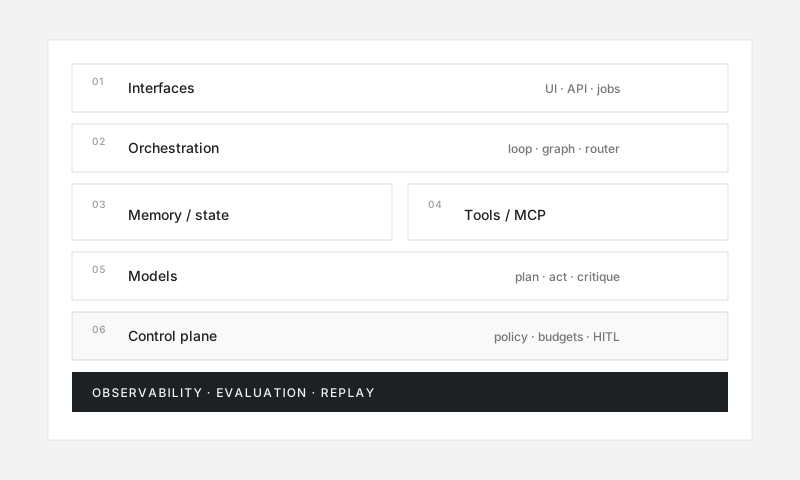
Agentic architecture is the system design that lets models pursue goals safely and repeatedly: not only a prompt, but a runtime with tools, state, controls, and observability.
This guide describes a reference model you can map onto LangGraph, CrewAI, custom code, or any orchestrator.
Reference architecture (layers)
┌─────────────────────────────────────────────┐
│  Interfaces: UI, API, Slack, tickets, cron  │
├─────────────────────────────────────────────┤
│  Orchestration runtime (graph / loop)       │
│  planner · router · executor · critic       │
├───────────────┬─────────────────────────────┤
│  Memory/state │  Tool adapters / MCP        │
├───────────────┴─────────────────────────────┤
│  Models (LLM / embeddings / rerankers)      │
├─────────────────────────────────────────────┤
│  Control plane: auth, policy, budgets, HITL │
├─────────────────────────────────────────────┤
│  Observability + evaluation + replay        │
└─────────────────────────────────────────────┘
1. Goal and interface layer
Every agent run starts with a goal artifact:
- User message or form input
- Structured job payload (
{ticket_id, priority, SLA}) - Scheduled objective (
reconcile failed payments nightly)
Good interfaces:
- Capture success criteria (“done when X is true”)
- Attach constraints (budget, systems allowed, deadline)
- Return progress and artifacts, not only a final paragraph
2. Orchestration runtime
The runtime owns the loop. Common shapes:
| Runtime style | Description | Typical fit |
|---|---|---|
| Simple loop | Think → act → observe | Prototypes, internal tools |
| Graph / state machine | Explicit nodes and edges | Production, auditability |
| Supervisor multi-agent | Manager delegates to specialists | Complex domains |
| Event-driven worker | Long-running jobs with queues | Ops, back office |
Prefer explicit state over hidden chat history for anything you will debug or evaluate.
See patterns: ReAct, plan-and-execute, multi-agent.
3. Model / planner layer
The model proposes:
- Next tool call
- Intermediate plan
- Final answer
- Escalation to a human
Production tips:
- Separate planning models from cheap execution models when cost matters
- Keep tool schemas strict (types, enums, required fields)
- Version prompts and model IDs; treat them as deployable config
4. Tool layer
Tools are the agent’s hands. Design them as a product surface:
- Least privilege credentials per tool
- Idempotent writes where possible
- Clear error contracts the model can recover from
- Human confirmation for irreversible actions
- Prefer standardized interfaces such as MCP when sharing tools across agents
Anti-pattern: one mega-tool that can do anything in your AWS account.
5. Memory and state
Distinguish four stores:
- Working memory — current trajectory / scratchpad
- Thread memory — conversation or job context
- User/org memory — preferences, durable facts (carefully governed)
- World knowledge — RAG over docs, tickets, code
Rules of thumb:
- Prefer structured state (JSON schema) over freeform prose for control flow
- Summarize long trajectories; do not infinitely grow context
- Separate secrets from model-visible memory
Deep dive: Agent memory systems.
6. Control plane (non-negotiable in production)
Put hard boundaries outside the model:
- Authentication and authorization
- Allowlists of tools and destinations
- Rate limits and spend caps
- PII redaction
- Human-in-the-loop gates
- Kill switches and circuit breakers
The model can suggest; the control plane decides what is permitted. See Safety and guardrails.
7. Observability and evaluation
You cannot improve what you cannot reconstruct.
Minimum telemetry per run:
- Goal + constraints
- Full tool I/O (redacted)
- Model calls (tokens, latency, model id)
- Decision points and escalations
- Final outcome + evaluator scores
Pair online logs with offline evaluation suites.
Single-agent vs multi-agent
Start single-agent when:
- One domain, shared tools, shared permissions
- You need simplicity more than parallelism
Introduce multi-agent when:
- Specialists need different prompts, models, or credentials
- Work parallelizes cleanly (research + writing + QA)
- You want isolation between risky tools and planning
Multi-agent is an org chart for software, not a free performance upgrade. It adds coordination cost.
Reference request lifecycle
- Accept goal + auth context
- Load policies, memory, and relevant retrieval
- Plan (optional explicit plan node)
- Execute tools under budget
- Critique / verify (tests, schema checks, secondary model)
- Finalize artifacts
- Write audit trail + eval labels
- Emit metrics
Architecture anti-patterns
- Prompt-as-platform — critical rules only in natural language
- God agent — one agent with every production credential
- Invisible tools — side effects with no structured logs
- Chat log as database — untyped history driving control flow
- No budget — unlimited steps until the bill arrives
- Eval after launch — quality unknown until users complain
Minimal viable production stack
If you ship one version, include:
- Typed tool interfaces
- Explicit max steps + max spend
- Trajectory logging
- One offline eval set for top tasks
- Human approval for irreversible actions
- A rollback / disable switch
Frameworks (directory) accelerate orchestration; they do not replace architecture judgment.
Summary
Agentic architecture is a closed-loop control system with a model in the decision seat and software around it for tools, state, policy, and measurement. Design the boundaries first; then choose a framework that matches your orchestration style.
FAQ
Frequently asked questions
What are the core components of an agentic architecture?
A production agent typically includes a goal interface, model/planner, tool layer, memory/state store, orchestrator/runtime, observability, evaluation hooks, and safety controls.
Do I need multi-agent architecture to start?
No. Start with a single agent loop and clear tools. Add multi-agent only when specialization, parallelism, or separation of privileges is clearly needed.
Where should business logic live—prompts or code?
Put durable rules, permissions, and invariants in code and policy engines. Use the model for judgment under uncertainty, not for hard security boundaries.